
Databricks Unity Catalog System Tables: Cost, Audit & Lineage SQL Queries
Unity Catalog system tables expose billing, audit, lineage, and compute data for your entire Databricks account as plain SQL - here's how to use them.
 Mory Kaba11 min read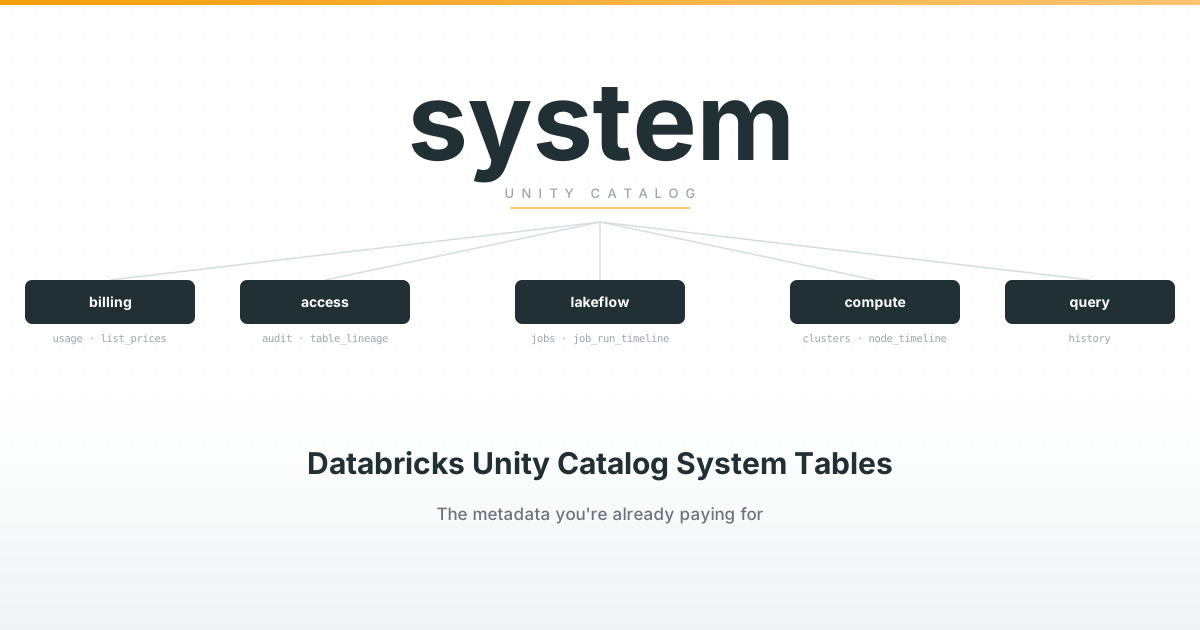
System tables in the Unity Catalog on Databricks are one of the most underutilized resources I come across on Databricks platforms. Most companies concern themselves with creating pipelines, dashboards or running ML models in Databricks - metadata about all these operations is usually not top of mind.
I would argue that the metadata in the system tables is very valuable and can help you answer critical questions about the data operations of the entire business:
- Which teams, projects or jobs are consuming the most DBUs, and is that spend justified?
- Which jobs run daily but haven’t been queried downstream in 3 months?
- What’s our cost per pipeline, domain or business unit?
- Which tables are we paying for that have no downstream consumers anymore?
- Who are the power users of our platform?
If you’re a data engineer, platform team, or FinOps analyst managing a Databricks account, these tables are your fastest path to answering cost, governance, and performance questions - without building any extra infrastructure.
In this article we will explore how Unity Catalog system tables help us answer these questions and help your organization improve its operational efficiency.
Key Takeaways
- Unity Catalog system tables are read-only, SQL-queryable tables that cover billing, audit, lineage, compute, and query history for your entire Databricks account
- They require no infrastructure to deploy - the
systemcatalog already exists if your metastore is on Unity Catalog system.billing.usagejoined withsystem.billing.list_pricesgives you cost in dollars, attributable to any team or project via custom tagssystem.access.auditandsystem.access.table_lineageanswer security and governance questions without a separate log pipelinesystem.compute.node_timelineexposes cluster utilization at the node level - usually the fastest source of cost savingssystem.query.historysurfaces the slowest queries and, combined with lineage, reveals tables that are refreshed but never read
What are Databricks Unity Catalog System Tables?
Unity Catalog system tables are built-in, read-only tables in Databricks that provide observability and governance data about your lakehouse environment.
They basically add an audit and metadata layer on top of everything that happens in your account, queryable via plain SQL. They live under the system catalog and are organized into schemas by domain:
| Schema | What it covers | Key tables |
|---|---|---|
system.billing | Billable usage and SKU pricing | usage, list_prices |
system.access | Audit logs and data lineage | audit, table_lineage, column_lineage |
system.lakeflow | Jobs and pipelines | jobs, job_run_timeline, job_task_run_timeline, pipelines |
system.compute | Clusters, warehouses and node utilization | clusters, warehouses, node_timeline, warehouse_events |
system.query | Query history on SQL warehouses and serverless | history |
Key characteristics
A few properties are worth knowing before you start querying:
- Read-only and Databricks-hosted. The data lives in Databricks-managed storage in your metastore’s region and is shared with you via Delta Sharing. You can’t modify it, and Databricks discourages exporting it off-platform.
- Account-wide scope. System tables include operational data from all workspaces in your account in the same region (some tables, like billing, are global) - even workspaces not on Unity Catalog. This makes them the only place where you get a single cross-workspace view.
- Free retention windows. Most tables keep 365 days of history for free; some (like
node_timeline) keep 90 days. The billing and pricing tables themselves cost nothing to query beyond the compute you run. - Not real-time. Data is updated throughout the day, not instantly. Fine for cost reports and audits, not a substitute for live monitoring.
- Schema can grow. Databricks may add columns at any time. Avoid
SELECT *into downstream tables unless you’ve enabled schema evolution.
How to enable Databricks system tables
If your workspace is on Unity Catalog, the system catalog already exists in your metastore - there is no infrastructure to deploy. What you need:
- A Unity Catalog-enabled workspace. System tables can only be accessed from one, and your metastore needs to be on Privilege Model 1.0.
- Grants. Account admins and metastore admins have access by default. For everyone else, an admin grants
USE CATALOGonsystem, plusUSE SCHEMAandSELECTon the relevant schemas:
GRANT USE CATALOG ON CATALOG system TO `finops-team`;
GRANT USE SCHEMA ON SCHEMA system.billing TO `finops-team`;
GRANT SELECT ON SCHEMA system.billing TO `finops-team`;
That’s it. Open a SQL editor and run SHOW SCHEMAS IN system to see what’s available in your account.
Use Cases for Unity Catalog System Tables
FinOps
This is the use case that usually gets people in the door. system.billing.usage records every billable unit consumed in your account, tagged with workspace, SKU, and - crucially - usage_metadata that ties spend back to the specific job, cluster, warehouse or pipeline that incurred it. Join it against system.billing.list_prices and you have cost in dollars, not just DBUs.
Because compute resources carry custom tags, you can roll costs up to whatever dimension your organization thinks in: team, project, domain, business unit. Adding a team tag to every cluster and job is the single highest-leverage action you can take before running any of the queries below - it turns workspace_id into a named cost center. Showback and chargeback stop being a quarterly spreadsheet exercise and become a dashboard.
If you’re also managing cloud infrastructure costs outside Databricks, the same tagging discipline applies at the AWS level - see AWS Cost Optimization: How to Reduce Your Bills Before They Spiral for how to connect the two.
Security Auditing
system.access.audit captures audit events across your workspaces: who logged in, who read which table, who changed permissions, who downloaded results. Instead of configuring audit log delivery to cloud storage and building a parsing pipeline, you query a table.
Typical questions: who accessed this PII table in the last 90 days? Which service principals had failed authorization attempts? Did anyone change grants on production catalogs outside of a deployment window?
system.access.column_lineage extends this to the column level - useful when you need to demonstrate to a data privacy officer exactly which downstream tables or reports consume a specific PII column.
Compute Optimization
system.compute.node_timeline gives you per-node CPU and memory utilization for your clusters. Join it with system.compute.clusters (the full configuration history of every cluster) and you can find the clusters that are oversized, the all-purpose compute that should be jobs compute, and the warehouses that idle all weekend. This is where most quick cost wins hide - not in exotic query tuning, but in compute that’s simply bigger or longer-running than the workload needs.
Pipeline Reliability
system.lakeflow.job_run_timeline records every job run with start time, end time, and result state. Aggregate it and you have a reliability dashboard: success rate by job, p95 run duration, jobs whose average runtime has grown 2× over the past month. Coupled with system.billing.usage, you can answer whether a job that’s gotten slower is also getting more expensive - and by how much.
This is especially useful for Spark Structured Streaming jobs, where degradation tends to be gradual and not caught until a pipeline is significantly behind.
Query Optimization
system.query.history records every query run on SQL warehouses and serverless compute, with duration, bytes read, rows produced, and who ran it. Sort by total execution time and you have a prioritized optimization backlog. It also answers the adoption questions: who are the power users, which dashboards actually get used, and which tables receive the most queries.
Combine it with lineage (system.access.table_lineage) and you can answer the more uncomfortable question: which tables do we refresh every night that nobody has read in months?
Example Queries
Cost per workspace and SKU, last 30 days, in dollars:
Use this as your starting point for any cost conversation. Replace GROUP BY 1, 2 with GROUP BY u.workspace_id, u.usage_metadata.job_id to shift from SKU-level to job-level attribution.
SELECT
  u.workspace_id,
  u.sku_name,
  ROUND(SUM(u.usage_quantity * p.pricing.effective_list.default), 2) AS cost_usd
FROM system.billing.usage u
JOIN system.billing.list_prices p
  ON u.sku_name = p.sku_name
  AND u.cloud = p.cloud
  AND u.usage_start_time >= p.price_start_time
  AND (p.price_end_time IS NULL OR u.usage_start_time < p.price_end_time)
WHERE u.usage_date >= current_date() - INTERVAL 30 DAYS
GROUP BY 1, 2
ORDER BY cost_usd DESC;
Most expensive jobs, with names:
This cross-schema join between billing and lakeflow is the fastest way to produce a cost-per-job report. The top entries are your optimization candidates - check whether they’re running on the right compute type and whether their output is actually consumed downstream.
SELECT
  j.name AS job_name,
  ROUND(SUM(u.usage_quantity * p.pricing.effective_list.default), 2) AS cost_usd
FROM system.billing.usage u
JOIN system.billing.list_prices p
  ON u.sku_name = p.sku_name
  AND u.cloud = p.cloud
  AND u.usage_start_time >= p.price_start_time
  AND (p.price_end_time IS NULL OR u.usage_start_time < p.price_end_time)
JOIN system.lakeflow.jobs j
  ON u.usage_metadata.job_id = j.job_id
  AND u.workspace_id = j.workspace_id
WHERE u.usage_date >= current_date() - INTERVAL 30 DAYS
  AND u.usage_metadata.job_id IS NOT NULL
GROUP BY 1
ORDER BY cost_usd DESC
LIMIT 20;
Tables that are written to but never read (last 90 days):
Every table this query returns is a candidate for decommissioning - you’re paying for the compute that refreshes it and the storage that holds it, for zero consumers. Cross-reference the top entries against the job cost query above to estimate the savings.
WITH writes AS (
  SELECT DISTINCT target_table_full_name AS table_name
  FROM system.access.table_lineage
  WHERE event_time >= current_date() - INTERVAL 90 DAYS
    AND target_table_full_name IS NOT NULL
),
reads AS (
  SELECT DISTINCT source_table_full_name AS table_name
  FROM system.access.table_lineage
  WHERE event_time >= current_date() - INTERVAL 90 DAYS
    AND source_table_full_name IS NOT NULL
)
SELECT w.table_name
FROM writes w
LEFT ANTI JOIN reads r ON w.table_name = r.table_name;
Who accessed a sensitive table:
Replace prod.hr.salaries with the fully qualified name of any table you want to audit. The result is a timestamped log of every user who triggered a getTable call - useful for access reviews and compliance reporting.
SELECT
  event_time,
  user_identity.email,
  action_name,
  request_params.full_name_arg AS table_name
FROM system.access.audit
WHERE service_name = 'unityCatalog'
  AND action_name = 'getTable'
  AND request_params.full_name_arg = 'prod.hr.salaries'
  AND event_date >= current_date() - INTERVAL 90 DAYS
ORDER BY event_time DESC;
Job reliability over the last 30 days:
Returns success rate and average duration per job. Jobs with a success rate below 0.95 or a rapidly increasing average duration are the ones to investigate first.
SELECT
  j.name AS job_name,
  COUNT(*) AS total_runs,
  ROUND(SUM(CASE WHEN r.result_state = 'SUCCEEDED' THEN 1 ELSE 0 END) / COUNT(*), 3) AS success_rate,
  ROUND(AVG(r.run_duration_seconds) / 60, 1) AS avg_duration_min
FROM system.lakeflow.job_run_timeline r
JOIN system.lakeflow.jobs j
  ON r.job_id = j.job_id
  AND r.workspace_id = j.workspace_id
WHERE r.period_start_time >= current_date() - INTERVAL 30 DAYS
  AND r.result_state IS NOT NULL
GROUP BY 1
ORDER BY success_rate ASC, total_runs DESC
LIMIT 20;
Platform power users by query volume:
Useful both for adoption reporting and for identifying whose queries to optimize first - the users running the most queries are the ones whose workload improvements will have the broadest impact.
SELECT
  executed_by,
  COUNT(*) AS query_count,
  ROUND(SUM(total_duration_ms) / 1000 / 3600, 1) AS total_hours
FROM system.query.history
WHERE start_time >= current_date() - INTERVAL 30 DAYS
GROUP BY 1
ORDER BY query_count DESC
LIMIT 20;
Conclusion
The pattern across all of these use cases is the same: questions that used to require exporting logs, calling REST APIs, or guessing are now a SQL query away. The system tables are already there, already populated, and mostly free to query - the only missing ingredient is someone deciding to look.
My suggestion: start with system.billing.usage. Build one dashboard showing cost per team or per job. The first time it surfaces a forgotten cluster or a nightly job feeding a table nobody reads, the rest of the organization will start asking for more.
When those dashboards turn into actual pipeline work - retiring forgotten jobs, reworking ingestion, genuinely lowering cost per team - that’s the handover from observing to data engineering.
For the full reference on what’s available, the Databricks system tables documentation lists every table, its schema, and its retention policy.
Frequently Asked Questions
What do Databricks Unity Catalog system tables cost?
The billing and pricing tables are free to use, and tables in Public Preview are free during the preview. You pay for the compute you use to query them, like any other table.
Are Databricks system tables real-time?
No. Data is updated throughout the day. If a recent event isn’t showing up, check back in a few hours.
Do system tables include all Databricks workspaces in my account?
Yes - all workspaces in the same cloud region, including non-Unity Catalog workspaces. Billing and pricing data is global. You just need one UC-enabled workspace to query from.
How long does Databricks retain system table data?
It varies by table. Most tables keep 365 days for free; node_timeline keeps 90 days; pricing and node types are retained indefinitely. If you need longer history, stream the tables into your own storage (set skipChangeCommits to true when you do).
Can I write to or modify Databricks system tables?
No, they’re read-only. If you need to enrich or retain the data, copy it into your own catalog.
Will Databricks system table schemas change?
Columns can be added at any time, but existing columns won’t change or be removed. Enable schema evolution on any downstream tables you write system table data into.
Newsletter
Get practical data engineering notes in your inbox
Occasional emails on lakehouses, dbt, Spark, RAG, and what actually works in production. No fluff, unsubscribe anytime.