How to Build a Data Lakehouse on AWS for Under $200/Month with DuckLake
How to build a runnable data lakehouse on AWS for under $200 a month using DuckLake, DuckDB, Postgres, and a Terraform reference implementation.
 Mory Kaba20 min read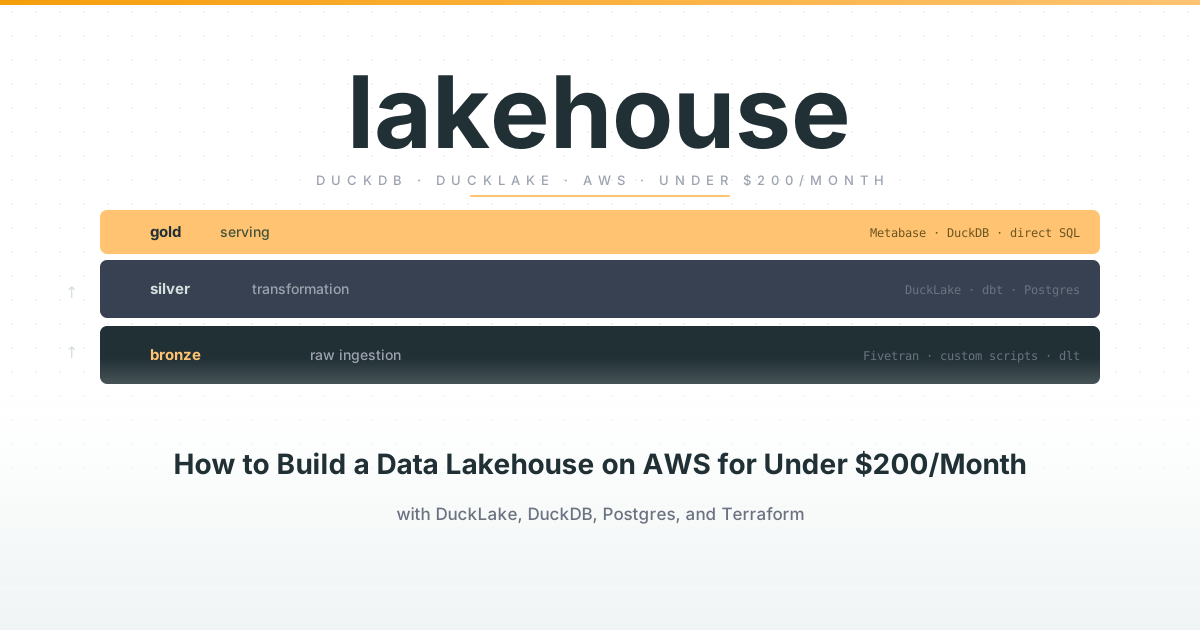
You join a new SaaS company with no existing data infrastructure. Your boss has heard about this thing called a data lakehouse and hired you to build one. He wants to become data-driven as fast as possible, with one caveat: the solution needs to be as cheap as possible.
As a seasoned data professional, you know better than to start provisioning warehouses on day one. So you set up a workshop to understand what the business actually needs. You find out the company has no visibility into its sales motion, the CRM is chaotic and unreliable, and financial numbers get questioned in every leadership meeting.
After a few sessions, the requirements crystallize:
- The organization wants reports and dashboards for both technical and non-technical users.
- It needs daily access to data from a handful of sources: CRM, sales tooling, financial systems, and a couple of application databases.
- The data is in the tens of gigabytes, not petabytes.
- Total system cost should stay under $500 a month, with room to add sources and use cases over time.
This is a very common profile for a Series A or B SaaS company. The data isn’t huge. The team isn’t large. But the need is real and the pain is immediate. Here’s how you could design a system for it.
Key Takeaways
- A lakehouse combines cheap object storage with warehouse-grade reliability through an open table format
- DuckLake bundles the table format and catalog into one, with metadata living in Postgres instead of a sprawl of small files
- DuckDB is an in-process OLAP engine with no servers to provision, just a library you import
- Concurrency is mediated through the Postgres catalog, so transformation jobs and dashboards can read and write the same dataset safely
- Metabase with the MotherDuck DuckDB driver gives non-technical users a UI on top of the same gold tables analysts query directly from DuckDB
- A daily-batch lakehouse for a small SaaS company comfortably fits under $200 a month, with most of the cost being the always-on Metabase instance
What a data lakehouse is
A lakehouse combines the best properties of two older paradigms: the data lake and the data warehouse. A data lake gives you cheap storage on object stores like S3, GCS, or Azure Blob Storage. A data warehouse gives you structure, schema enforcement, and transactional guarantees. A lakehouse is the attempt to get both at once: lake-cheap storage with warehouse-grade reliability.
The key enabler is the open table format. Delta Lake, Apache Iceberg, and DuckLake (which this article focuses on) all sit on top of raw files in object storage and add the things a warehouse takes for granted: ACID guarantees so concurrent writes don’t corrupt your tables, schema enforcement so a bad upstream change doesn’t silently rot your data, and time travel so you can query the table as it looked last Tuesday.
Whatever format you pick, every lakehouse breaks into the same three stages.
- Ingestion pulls data out of source systems and lands it in storage.
- Transformation cleans, joins, and models the raw data into something analysts can trust. In a lakehouse the data usually flows through different layers: bronze, silver and gold. This layered design ensures data is prepared, cleaned and transformed in stages that build upon each other.
- Serving exposes that modeled data to dashboards and queries.
Underneath all three, two pieces hold the lakehouse together: the catalog and the file format.
The catalog
The catalog is the entry point for query engines. It registers what tables exist, where their files live, and what metadata describes them. This is how a compute engine discovers a table without you hardcoding file paths everywhere.
For Apache Iceberg the catalog is usually AWS Glue, a Hive Metastore, or a REST catalog. For Delta Lake it’s typically Unity Catalog. These are separate services you have to run and pay for, and at small scale that overhead is real. Hold that thought, because it’s exactly where DuckLake does something different.
The file format
The data itself lives in Parquet. Parquet is a columnar format, which means values from the same column are stored together rather than row by row. For analytics that’s the whole game. A dashboard query that sums revenue over a date range only touches two columns, so a columnar layout lets the engine read just those two and skip everything else. Parquet also carries per-file statistics like min and max values, which lets a query engine prune entire files it knows can’t match a filter before reading a single byte of them.
So the storage layer is just Parquet files sitting in a bucket. The table format and catalog turn that pile of files into something that behaves like a real database.
DuckDB and DuckLake
DuckDB is an in-process OLAP query engine. “In-process” means it runs inside your application like SQLite does, not as a separate server you connect to over a network. There’s nothing to provision and nothing to keep running. You import a library, point it at some Parquet files, and you have a fast analytical query engine. For tens of gigabytes on a single machine, it’s genuinely fascinating how far a single machine can get you.
DuckDB on its own queries files. DuckLake is what turns those files into a lakehouse. It’s worth being precise here, because DuckLake isn’t quite the same kind of thing as Iceberg or Delta. Iceberg and Delta are table formats that still need an external catalog bolted on. DuckLake is both the table format and the catalog in one, and it makes a specific architectural bet: metadata belongs in a real database, not in a sprawl of small JSON and Avro files on object storage.
So a DuckLake setup has two stores:
- Data lives in Parquet on object storage, exactly like any other lakehouse.
- Metadata lives in a SQL database. SQLite or DuckDB itself works for local development, but for anything shared you put it in Postgres.
This split is the entire point. Iceberg and Delta write their metadata as files alongside the data, which means every query has to list and read a pile of small files over the network just to figure out a query plan. Putting that same metadata in Postgres turns those lookups into fast indexed queries against a database built for exactly this. The metadata is tiny, usually well under one percent of the data size, so a small Postgres instance handles it without breaking a sweat. A Postgres-backed DuckLake scales to hundreds of terabytes, which is wildly more headroom than our SaaS company will need for years.
How DuckLake compares to Iceberg and Delta Lake
Three open table formats dominate the lakehouse conversation today, and they make different architectural bets. The table below captures where they diverge.
| Feature | DuckLake | Apache Iceberg | Delta Lake |
|---|---|---|---|
| Catalog | Built-in, backed by Postgres, SQLite, or DuckDB | External: Glue, REST, Hive, Nessie, or others | External: Unity Catalog, Hive, or file-based |
| Metadata storage | SQL database | JSON + Avro files in object storage | JSON + Parquet files in object storage |
| ACID transactions | Yes, mediated by the catalog database | Yes, via atomic manifest commit | Yes, via the transaction log |
| Time travel | Yes | Yes | Yes |
| Schema evolution | Yes | Yes | Yes |
| Concurrent writers | Mediated by the catalog database | Optimistic concurrency control | Optimistic concurrency control |
| Primary query engines | DuckDB | Spark, Trino, Flink, DuckDB | Spark, Trino, Polars |
| Maturity | New, open-sourced in 2025 | Mature, broad adoption | Mature, Databricks-led |
| Best fit | Small-to-medium teams on a single engine | Large-scale, multi-engine environments | Databricks- and Spark-heavy stacks |
For our SaaS company the calculus is straightforward. There’s one engine (DuckDB), no Spark cluster to feed, and a strong preference for fewer moving parts. The built-in Postgres catalog is a feature rather than a limitation, because Postgres is already a service we’d run anyway.
Designing the cheapest lakehouse
With the pieces in place, the architecture almost falls out on its own. Parquet in a bucket, metadata in Postgres, DuckDB as the engine, and a thin layer of cheap compute around it for ingestion and serving.
Reference implementation
A complete Terraform stack that builds this architecture on AWS is open-source at github.com/m-l-kaba/ducklake_aws. Deployment steps and cost details follow below.
Ingestion
You don’t need a heavyweight ingestion platform for a handful of sources pulled once a day. Write small extract jobs, one per source, that hit the source API or database and land raw data as Parquet in object storage. Package each one as a container image.
For scheduling and orchestration on AWS, EventBridge fires the jobs on a daily cron and Step Functions coordinates anything with dependencies, like waiting for all extracts to finish before kicking off transformation. The jobs themselves run on Fargate, so you only pay for the minutes they’re actually running. A daily extract that takes five minutes costs almost nothing. The broader principles behind keeping these numbers low (picking the cheapest compute primitive that fits the workload, tagging everything from day one, watching feature-based charges) are covered in our guide to AWS cost optimization. The same pattern maps cleanly onto other clouds: Cloud Run jobs with Cloud Scheduler on GCP, or Container Apps jobs with Logic Apps on Azure.
If writing custom extractors feels like too much, an ingestion library like dlt ships a DuckLake destination out of the box and handles schema inference and incremental loads for you. Either way the output is the same: raw source data sitting in Parquet, ready to model.
Transformation
This is where DuckLake earns its keep. Run DuckDB inside containers, on the same Fargate or Cloud Run setup as your ingestion jobs, and have them read the raw data, transform it, and commit the results back to the lakehouse. Each commit writes Parquet to object storage and records the metadata transaction in Postgres.
Structure the transformations as the usual medallion layers. Bronze is the raw landed data, untouched. Silver is cleaned and conformed, with types fixed, duplicates removed, and keys reconciled across the messy CRM and the financial systems. Gold is the business-ready models the dashboards read from, things like a daily revenue table or a clean opportunities-to-closed-won funnel.
Attaching a DuckLake catalog from DuckDB is a single statement:
INSTALL ducklake;
INSTALL postgres;

ATTACH 'ducklake:postgres:dbname=lakehouse host=your-postgres-host' AS lake
  (DATA_PATH 's3://your-bucket/lake/');

USE lake;
From there it’s just SQL. You read from one layer, write to the next, and every write is an ACID transaction recorded in the catalog.
What the bucket actually looks like
After a few pipeline runs, the bucket itself is striking in how unremarkable it looks. There’s no _delta_log/ directory full of JSON files, no metadata/ folder sprawling with Avro manifests. Just Parquet, organized by schema and table:
s3://your-bucket/lake/
├── bronze/
│   ├── crm_accounts/
│   │   ├── ducklake-019081d0-aa44-7c8a-95f4-2fe7d1eb2cea.parquet
│   │   └── ducklake-01908224-bb55-7e9c-a651-3fd8e2fc31db.parquet
│   └── stripe_invoices/
│       └── ducklake-019082f7-cc66-7f0a-b762-4fe9f3fd42ec.parquet
├── silver/
│   └── customers/
│       └── ducklake-01908391-dd77-7e1b-c873-5ff0f4fe53fd.parquet
└── gold/
    ├── revenue_daily/
    │   └── ducklake-01908452-ee88-7f2c-d984-6ff1f5ff64fe.parquet
    └── opportunities_closed_won/
        └── ducklake-019084c1-ff99-7f3d-e095-7ff2f6ff75ff.parquet
The catalog’s worth of information is sitting in Postgres, where indexed queries answer “which files belong to gold.revenue_daily right now?” in milliseconds. Everything in the bucket is data, which makes lifecycle policies, replication, and ad-hoc inspection refreshingly simple.
Serving
The user-facing notes flagged this as the tricky part, and historically it was. Vanilla DuckDB has a hard concurrency limit: a single process can read and write, or multiple processes can read, but you can’t have writers and readers on the same database at the same time. That’s a problem when transformation jobs want to write while a dashboard wants to read.
DuckLake removes that limitation, and this is the quiet reason it fits this architecture so well. Because concurrency is mediated through the transactional Postgres catalog instead of a file lock, multiple DuckDB processes can read and write the same dataset safely. Your transformation containers can keep committing to gold tables while the dashboard reads from them, with no corruption and no coordination on your part.
For the dashboard layer itself, use Metabase with the community DuckDB driver maintained by MotherDuck. Metabase gives both technical and non-technical users a clean interface to build dashboards and ask questions without writing SQL, which is exactly what the workshop surfaced as the need.
The deployment is small but worth getting right end-to-end.
Container image
Metabase ships an official Docker image, but the DuckDB driver needs to live in its /plugins directory. The cleanest approach is a tiny derived image that bakes the driver in:
FROM metabase/metabase:latest

ADD --chmod=644 \
  https://github.com/motherduckdb/metabase_duckdb_driver/releases/latest/download/duckdb.metabase-driver.jar \
  /plugins/duckdb.metabase-driver.jar
Two practical gotchas worth knowing. Metabase Cloud doesn’t allow custom drivers, so you need a self-hosted instance, which is a small always-on container anyway. And the DuckDB driver needs glibc, so stick to the Debian-based image and avoid any -alpine tag.
Where to run it
On AWS, run the image as an always-on Fargate service behind an Application Load Balancer. One vCPU and 2 GB of memory is more than enough for a small team. Point the MB_DB_* environment variables at a database for Metabase’s own application data. You can reuse the same managed Postgres that holds the DuckLake catalog (as a separate database on the same instance), which saves you a second managed DB without entangling the two schemas. The equivalent on GCP is a Cloud Run service in always-on mode, and on Azure a Container App with minReplicas of 1.
Connecting Metabase to DuckLake
Inside Metabase, create a new database connection of type DuckDB. The driver lets you provide init SQL that runs when the embedded DuckDB process opens. Use it to install the DuckLake and Postgres extensions, attach the catalog read-only, and switch into it:
INSTALL ducklake;
INSTALL postgres;
ATTACH 'ducklake:postgres:dbname=lakehouse host=<host> user=<readonly-user> password=<pw>'
  AS lake (DATA_PATH 's3://your-bucket/lake/', READ_ONLY);
USE lake;
From the user’s perspective, this looks like a normal database in Metabase. They browse the gold schema, pick the revenue_daily table, and start building charts. The fact that the data is sitting in S3 and the catalog is in Postgres is invisible to them.
Provisioning for non-technical users
A few small steps make the difference between “they have access” and “they actually use it”:
- Restrict Metabase data permissions so business users only see the
goldschema. Hidebronzeandsilverentirely so the database browser stays uncluttered. - Define a Metabase Model for each gold table, with a clear name, description, and column documentation. Models become the entry point in the query builder for users who don’t write SQL.
- Hook authentication into SSO (Google, Microsoft, or Okta via SAML) rather than handing out individual Metabase accounts. Map SSO groups onto Metabase permission groups: Sales sees the sales models, Finance sees revenue, everyone sees the top-level KPI dashboard.
- Build a starter dashboard for each function before rollout. Empty Metabase tends to feel intimidating; a dashboard with five pre-built charts gives non-technical users a clone-and-adapt starting point.
- The
READ_ONLYflag on the ATTACH plus a read-only Postgres user on the catalog connection mean even a runaway query in Metabase can’t corrupt the lakehouse.
When SQL is faster than clicking
Not every user wants a dashboard. Analysts who already know SQL often just want to point DuckDB at the lakehouse and explore. From a notebook or a local DuckDB shell, the connection looks almost identical to Metabase’s:
import duckdb

con = duckdb.connect()
con.execute("INSTALL ducklake; INSTALL postgres;")
con.execute("""
    ATTACH 'ducklake:postgres:dbname=lakehouse host=<host> user=<readonly-user>'
      AS lake (DATA_PATH 's3://your-bucket/lake/', READ_ONLY)
""")

weekly_revenue = con.execute("""
    SELECT
        date_trunc('week', closed_at) AS week,
        SUM(amount)                   AS revenue,
        COUNT(*)                      AS deals_won
    FROM lake.gold.opportunities_closed_won
    WHERE closed_at >= current_date - INTERVAL 12 WEEK
    GROUP BY week
    ORDER BY week
""").df()
The query reads Parquet directly from S3, the catalog answers “which files are current?” from Postgres, and the result lands in a pandas DataFrame. No warehouse to spin up, no cluster to keep warm. The same pattern works for ad-hoc investigations, scheduled reports written as scripts, or feeding data into a notebook for deeper analysis.
Deploying this on AWS with Terraform
The reference implementation builds on a fresh AWS account in around 15 minutes. Prerequisites are awscli v2, Terraform 1.6 or newer, Docker, Python 3.12, make, and AWS credentials with administrator permissions.
The deploy flow is four make targets:
cp .env.example .env          # set REGION and METABASE_ADMIN_EMAIL
make deploy                   # provisions all AWS resources (~7 minutes)
make build-images             # builds and pushes the jobs + Metabase images
make run-once                 # seeds the lake with the first day of data
make setup-metabase METABASE_ADMIN_EMAIL=you@example.com
Once setup-metabase finishes, the Metabase ALB URL is printed as a Terraform output. The DuckLake catalog connection is wired up automatically, so the tables produced by make run-once are immediately queryable from Metabase’s query builder.
Running cost in eu-central-1 lands around $130 per month while the stack is fully active. The largest line items are the NAT Gateway, the always-on Metabase Fargate task, the ALB, and the small managed Postgres. The repo ships make pause and make resume targets so you can stop the Metabase service overnight and on weekends when nobody is looking at dashboards, which brings the bill closer to $100 per month with an aggressive pause schedule. Costs vary by region, and active AWS Free Tier credits on a new account reduce the catalog line further.
What this costs
At tens of gigabytes with daily batch jobs, the numbers are small enough to be almost boring.
| Component | What you run | Rough monthly cost |
|---|---|---|
| Object storage | S3 holding tens of GB of Parquet | a few dollars |
| Catalog | Small managed Postgres (e.g., db.t4g.micro + 20 GB gp3) | $15 to $30 |
| Ingestion + transformation | Fargate tasks running minutes per day | $1 to $5 |
| Serving | Always-on Metabase Fargate task (1 vCPU / 2 GB) | $30 to $45 |
| Networking | NAT Gateway, ALB, Secrets Manager VPC endpoint | $65 to $85 |
| Orchestration | EventBridge + Step Functions | effectively free at this scale |
That lands comfortably under $200 a month, well inside the $500 budget. The largest line items (NAT Gateway, ALB, and the always-on Metabase task) are fixed-cost and do not scale with data volume. Adding the next data source means writing one more extract job and a few more transformation models. The bill barely moves. The numbers above are for eu-central-1 outside of any AWS Free Tier credits; other regions move by 10–20%.
When this design stops working
Every architecture has a scale beyond which its assumptions stop holding. For this one, four things are worth watching.
Multi-engine needs. The whole design leans on DuckDB. If you need Spark for distributed ML training, Flink for stream processing, or Trino to federate queries across multiple lakehouses, DuckLake’s DuckDB-primary stance gets awkward. Iceberg with AWS Glue or a REST catalog is the standard answer when multiple engines need to read and write the same tables.
Scale past a few terabytes. A single DuckDB process can comfortably chew through tens of gigabytes and stretch into low single-digit terabytes for well-modeled gold tables. Past that, transformation jobs slow down and the single-node model starts to creak. The Postgres catalog itself scales much further (DuckLake claims hundreds of terabytes), but the engine becomes the bottleneck. At that point a managed warehouse (Snowflake, BigQuery, Athena on Iceberg) is usually a better fit.
Sub-minute freshness. Daily batch is the article’s premise. DuckLake supports frequent micro-batch commits, but it isn’t designed for row-level streaming ingestion. If business users need dashboards that reflect events within seconds (fraud monitoring, live ops, real-time pricing), you’ll want Kafka + Flink + Iceberg or a streaming-first warehouse instead.
Team growth past 5–10 analysts. Small teams thrive without heavy governance. Once you have multiple business domains, regulated data, and dozens of dashboards across functions, you’ll feel the absence of mature tooling like column-level lineage, fine-grained RBAC, and data contracts. DuckLake doesn’t ship these out of the box; Iceberg with Unity Catalog or a managed Lakehouse platform fills that gap.
DuckLake is also new, open-sourced in 2025, so production deployments are still rare. If you can’t tolerate occasionally hitting a fresh bug or waiting on missing features, the more mature options are safer.
Final thoughts
The interesting thing about this design isn’t that it’s cheap. It’s that cheap and capable stopped being a tradeoff. A few years ago, getting ACID tables, time travel, and a real catalog meant paying for a warehouse or running a Spark cluster and a separate metastore. Now it’s Parquet in a bucket, a small Postgres, and an in-process engine that costs nothing when it isn’t running. The company that just wanted to stop arguing about its numbers in leadership meetings can have that for the price of a team lunch, and grow into a serious platform from the exact same foundation.
The foundation matters, but so does what you build on top of it. Even the most elegant lakehouse turns into sunk cost without a clear data strategy defining which decisions the data should actually improve.
Whether this pattern holds for your team, or a conventional cloud data warehouse is the better answer, gets settled in the architecture work beforehand - not in the Terraform afterwards.
Frequently Asked Questions
What is DuckLake?
DuckLake is an open table format released by DuckDB Labs in 2025 that combines a Parquet-based data lake with a SQL catalog (Postgres, SQLite, or DuckDB itself) for metadata. Unlike Apache Iceberg or Delta Lake, DuckLake stores all transactional metadata in a database rather than in files alongside the data, which makes catalog operations faster and removes the need for a separate catalog service.
How is DuckLake different from Apache Iceberg or Delta Lake?
Iceberg and Delta Lake store their metadata as JSON, Avro, or Parquet files in object storage, and both require an external catalog (Glue, REST, Hive, Unity Catalog) for production use. DuckLake bundles the catalog into the format itself by putting metadata in a SQL database. The result is fewer moving parts, faster metadata lookups, and an architecture better suited to single-engine deployments. Iceberg and Delta remain the better choice when you need multi-engine support across Spark, Trino, Flink, and Databricks.
Is DuckDB production-ready for a real lakehouse?
For small-to-medium analytical workloads (tens to low hundreds of gigabytes of data, daily batch transformations, dashboards for tens of concurrent users), yes. DuckDB is widely deployed in production for this profile, and DuckLake’s Postgres-backed catalog scales comfortably into the hundreds of terabytes. It is not the right choice for petabyte-scale workloads, sub-minute streaming requirements, or multi-engine architectures.
Can DuckLake handle real-time or streaming data?
Not natively. DuckLake is designed for batch ingestion and transactional commits, not row-level streaming. For sub-minute freshness you would need Kafka or another streaming layer in front, micro-batching writes into DuckLake every few minutes. At that point an Iceberg + Flink architecture is often a better fit.
When should you NOT use DuckLake?
Avoid DuckLake when you need multi-engine support (Spark for ML, Trino for federated queries), petabyte-scale data, streaming-first ingestion, or mature governance tooling like fine-grained RBAC, column-level lineage, or data contracts. At that scale, Iceberg with a managed catalog or Delta Lake on Databricks are better-tested options.
How much does a small DuckLake-based lakehouse cost per month?
For a SaaS company with tens of gigabytes of data and daily batch jobs, total monthly cost lands comfortably under $200. The largest line items are the networking layer (NAT Gateway, ALB, and a Secrets Manager VPC endpoint, around $65–$85), the always-on Metabase Fargate task ($30–$45), and the managed Postgres catalog ($15–$30). Object storage, compute for ingestion and transformation, and orchestration combined typically stay below $10. Numbers are for eu-central-1 and assume no AWS Free Tier credits.
Is there a reference implementation I can deploy?
Yes. The architecture in this article is available as an open-source Terraform reference implementation on GitHub. It provisions the VPC, RDS Postgres catalog, ECS Fargate tasks for ingestion and transformation, the Metabase visualization service behind an ALB, and the EventBridge plus Step Functions orchestration on AWS. Deployment is four make targets. Running cost in eu-central-1 is around $130 per month with the stack fully active, or roughly $100 per month when the Metabase service is paused outside business hours via the included make pause and make resume targets.
Newsletter
Get practical data engineering notes in your inbox
Occasional emails on lakehouses, dbt, Spark, RAG, and what actually works in production. No fluff, unsubscribe anytime.